 SnipInvoice
Voice it. Bill it. Done.
Speak for ten seconds.
Get an invoice you can trust.
SnipInvoice is for plumbers, electricians and HVAC techs. Say who the job was for, what you did and what it costs — then read back a finished invoice before anyone else sees it.
In closed testing on Android now. Ask for an invite.
Built to be checked, not just generated
The hard part was never producing an invoice. It was producing one you can trust at a glance — so every assumption is marked on the invoice itself.
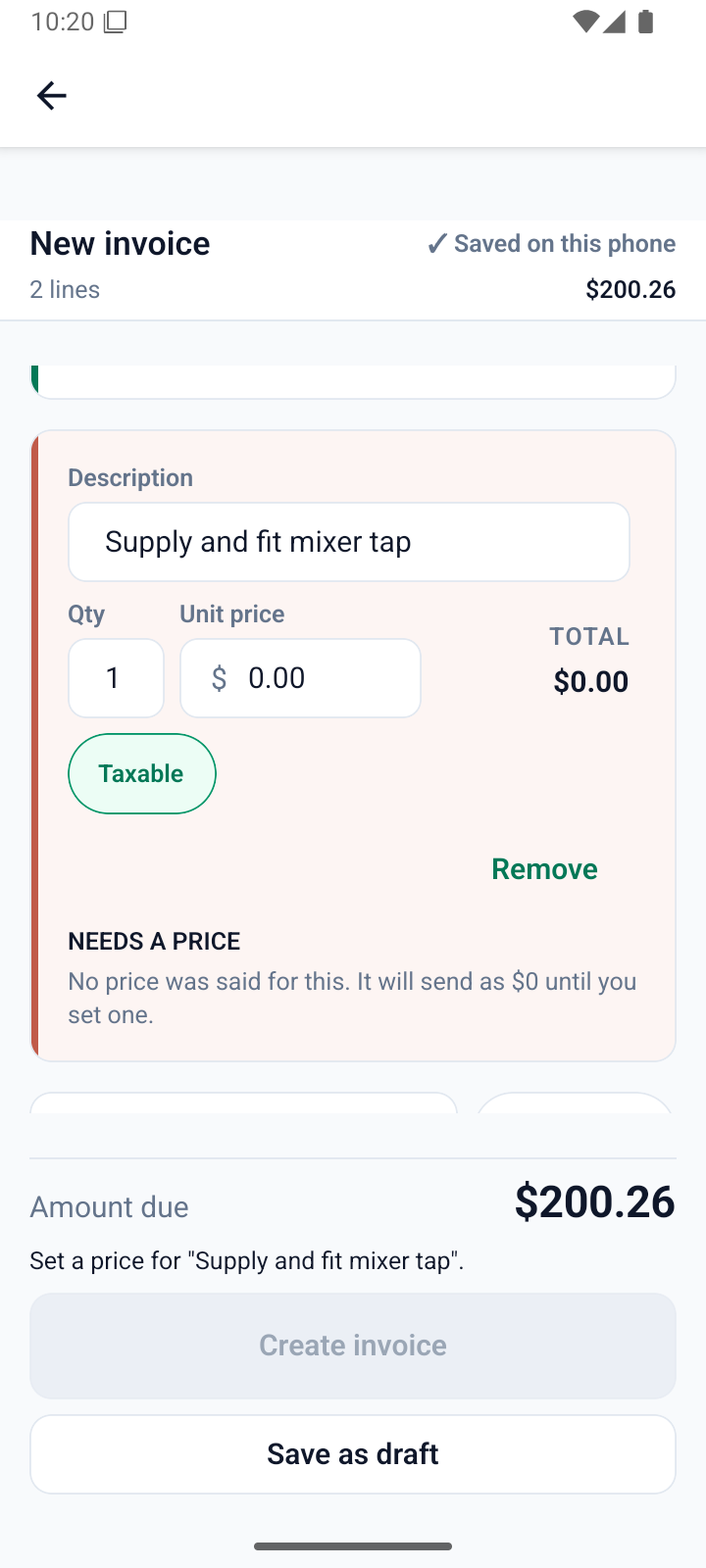
A missing price stays missing
It is never quietly filled in with a guess. The line says so, and the invoice will not pretend otherwise.
Assumptions are flagged
If a number was read as a line total rather than a price each, that line tells you before your client ever sees it.
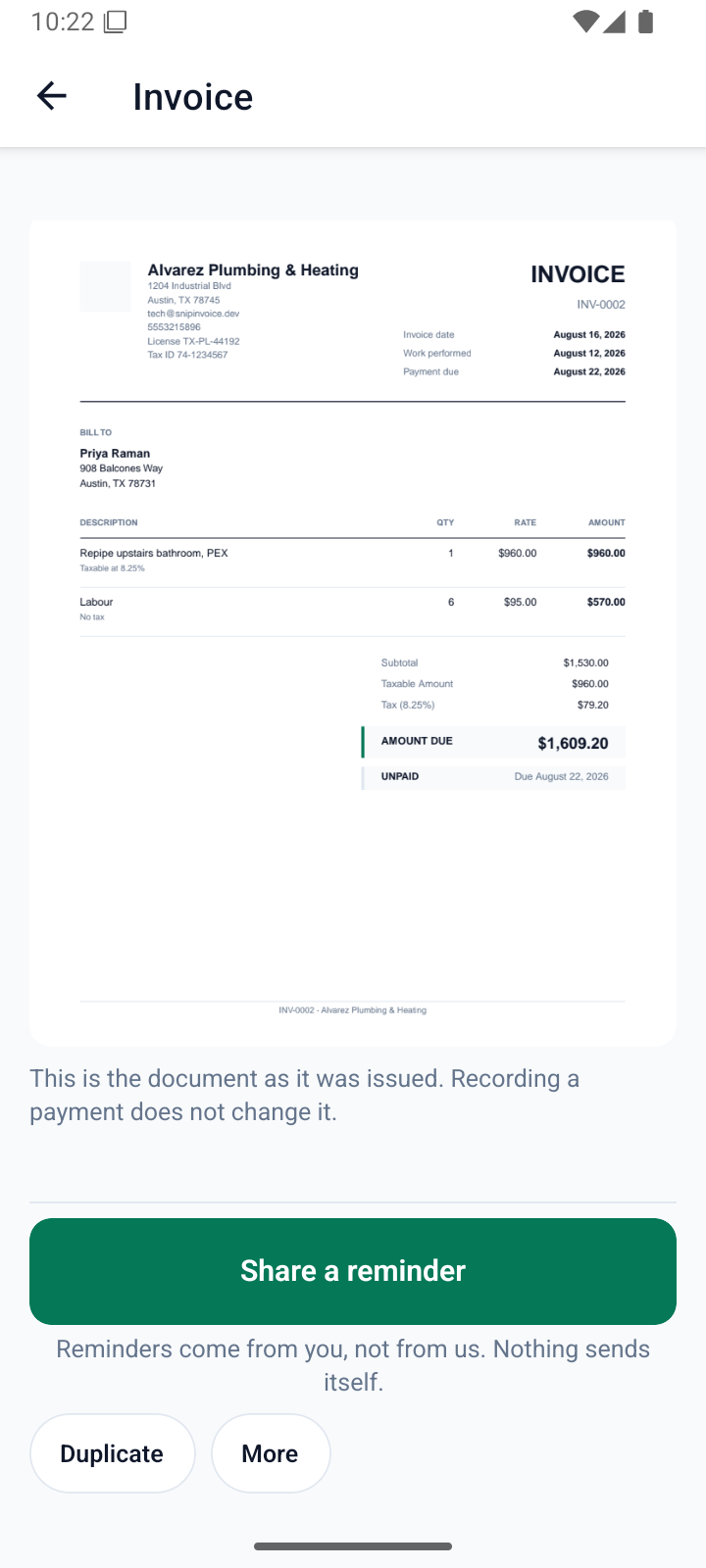
Tax is per line
Trade jobs mix taxable materials with untaxed labour. The invoice reflects that, because your filing has to.
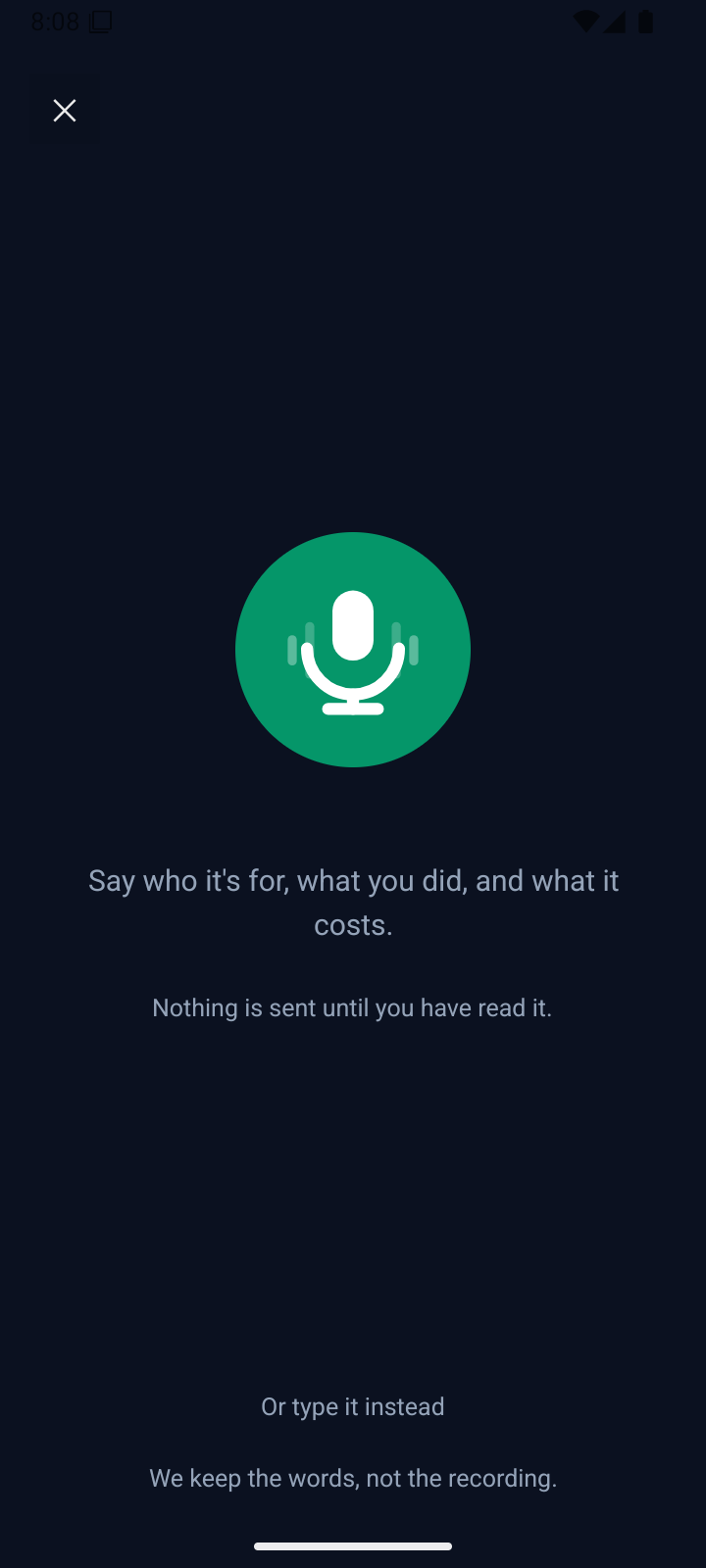
Step one — speak
Talk to it the way you would tell your bookkeeper
Hold the button and describe the job in your own words. No form, no fields, no tapping through a wizard with one clean hand.
- Ten seconds of talking is a whole invoice.
- Recording only while you hold the button — never in the background.
- We keep the words, not the recording. The audio is discarded once it becomes text.
- Or point the camera at a handwritten work order instead.
Step two — check
Read it back before anybody else does
The review screen is the one that got the most design attention, because it is the one that decides whether you trust the thing.
- A green edge means the line was understood cleanly.
- A coral edge means it needs you — here, a tap with no price said for it.
- Nothing sends until you say so. A $0 line is called out, not hidden.
- Correct anything by typing — quantity, price, tax, description.
Step three — send
It goes out from your phone, not from a stranger
The finished PDF is handed to your own messages, mail or WhatsApp — from your number, to a client who already has you in their contacts.
- No email from an address your client has never seen.
- A real document — your business name, licence and tax number on it.
- Card payments settle straight into your own account.
- Cash and cheques are recorded just as easily.
And then
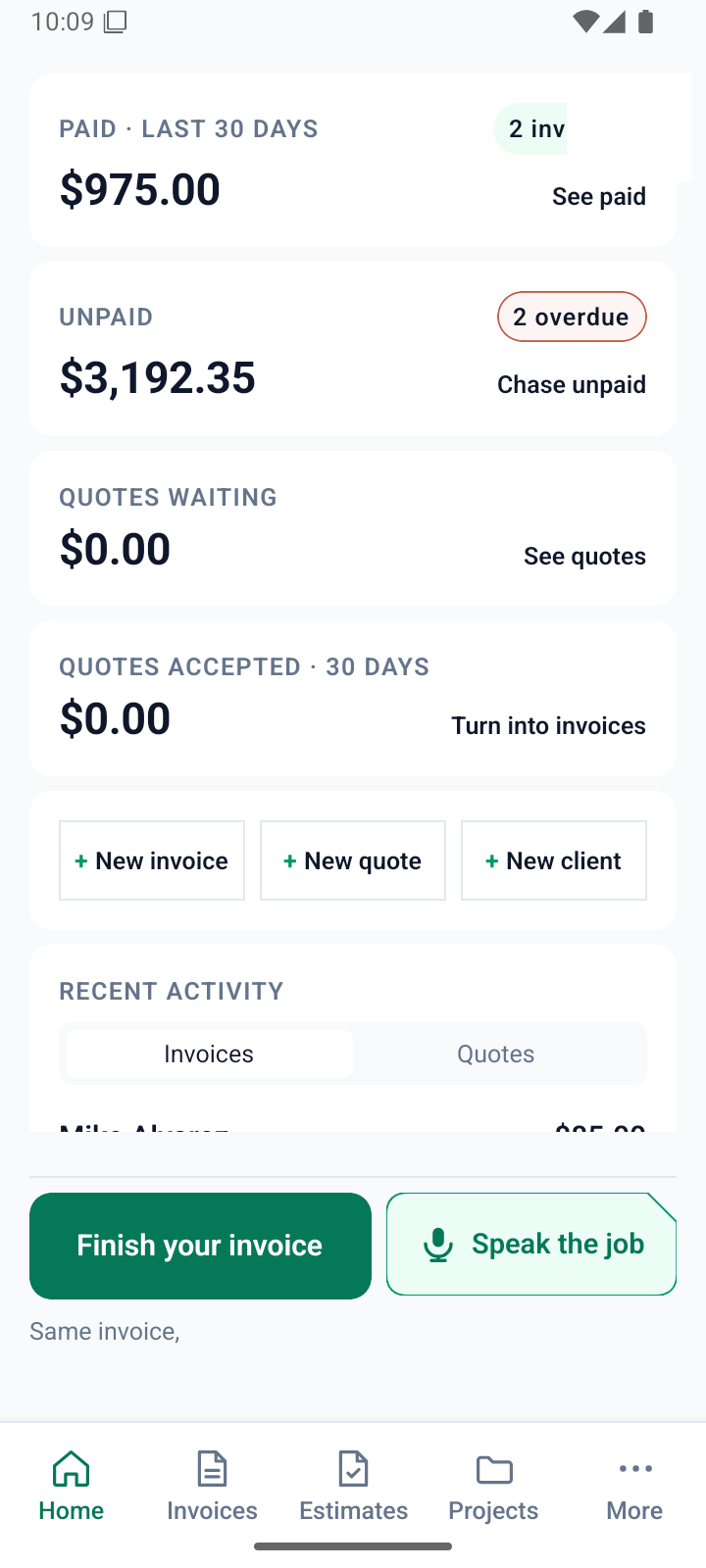
Know what you are owed without doing arithmetic
Every figure on the home screen comes from the same records the lists show you, so nothing on one screen can disagree with another.
- Paid, unpaid, quotes waiting, quotes accepted — four numbers, one glance.
- Overdue is worked out from the date, not from somebody remembering to mark it.
- Part-payments are tracked, so "still owed" is always the real figure.
- Chase it with one tap — a reminder you send, not one we send for you.
Pricing
One subscription, billed monthly. Quotes are always free to send — you are only charged when you turn work into a bill.
Free
$0
3 invoices a month
- Voice and camera capture
- Unlimited quotes
- PDF invoices
Starter
$5.99
6 invoices a month
- Everything in Free
- No footer on your invoices
- Card payments
Most trades pick this
Busy
$13.99
15 invoices a month
- Everything in Starter
- Projects and saved items
- Your team, with roles
Unlimited
$19.99
Unlimited invoices
- Everything in Busy
- For full-time trades
- Priority support
When it runs late
Chase it without sounding like a debt collector
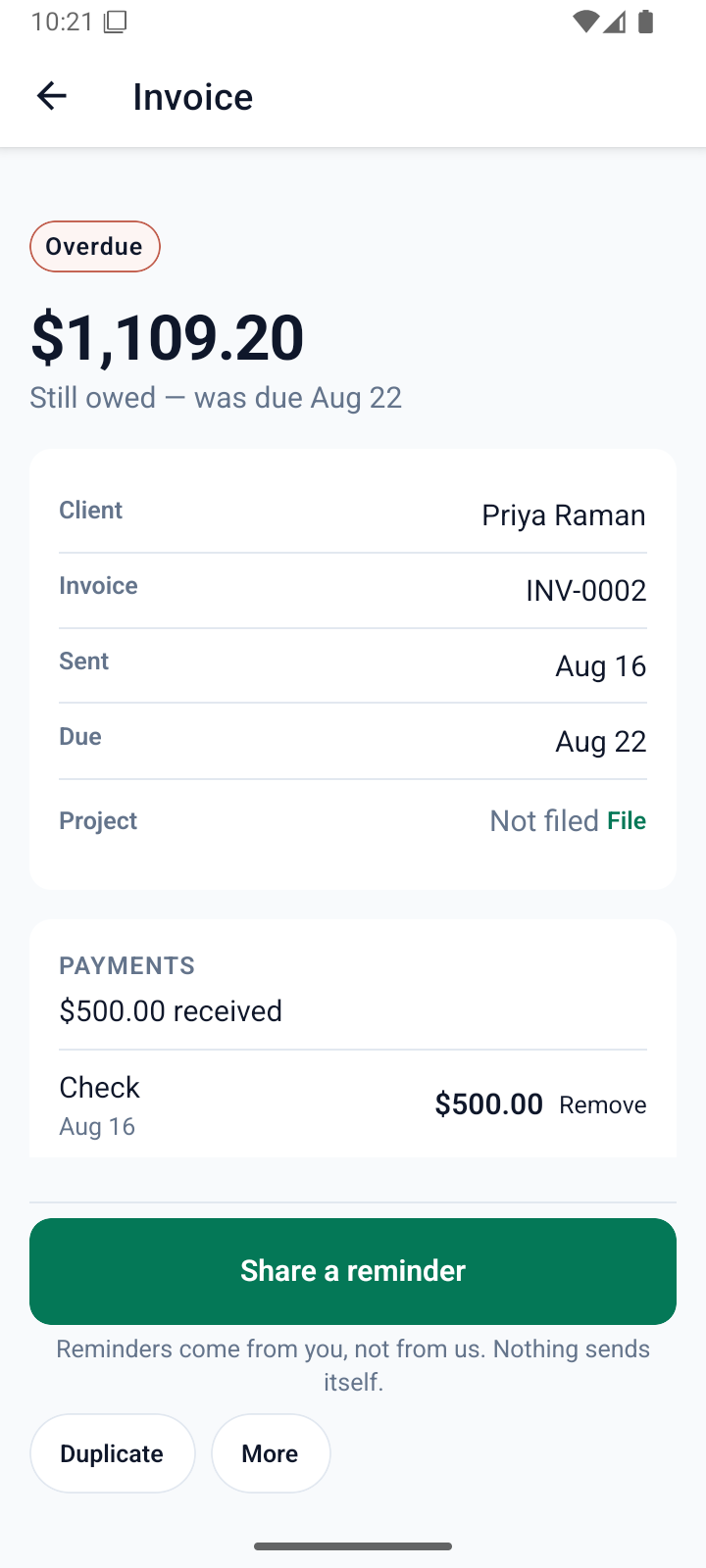
An overdue invoice shows what is still owed against what has already come in, and the reminder goes out from you.
- Part-payments are shown — cash, cheque, bank or card, with the date.
- "Still owed" is the real number, not the original total.
- One tap opens your own messages with the follow-up ready.
- Nothing sends itself. No automated email goes to your client, ever.
Questions
Do I have to talk to it?
No. Every invoice can be typed instead, and the app is fully usable without ever recording anything. Voice is the fastest way in, not the only one.
Is my recording kept?
No. It goes from your phone, to our server, to the transcription provider, and is discarded — no bucket, no cache, no retention window. The written text is what we keep. A microphone records whatever is audible, so we tell you what to say rather than promising what it cannot hear.
What happens if it mishears a price?
You see it before your client does. That is the whole point of the review screen — a line it was unsure about is marked, and a price it never heard is left visibly blank rather than invented.
Do you email my clients?
Never. You send the invoice yourself, from your own phone. We do not contact your clients at all, and there is no server here that could.
How do card payments work?
Your client pays on a page hosted by Stripe and the money settles into your own account. We never see or store a card number. Stripe's processing fee comes out of the payment; your client is never charged extra.
Can I get my data out?
One tap in Settings exports every invoice, quote, client and line item as a single file. No request form and no waiting. Deleting your account is one tap too.
Ten seconds beats ten minutes at the kitchen table
SnipInvoice is in closed testing on Android. If you run a trade and want to try it, say so and we will send you an invite.